


 Belgium
 Denmark
 Finland
 Germany
 Malaysia
 Netherlands
 Norway
 Poland
 Sweden
 UK
UK



In May 2026, Microsoft's security team disclosed a breach case study. A single compromised identity escalated into a full compromise of a targeted organization's Microsoft 365 and Azure environment. The campaign, tracked as Storm-2949, didn't need malware or a software exploit. It relied on social engineering, a self-service password reset flow, and a tenant with gaps in its configuration. From there, the campaign moved through OneDrive and SharePoint, exfiltrating data across the environment.
Cases like this share a common thread: not a missing patch, but a setting that was never locked down.
How Microsoft 365 security assessment works
Microsoft 365 is the backbone of business operations for millions of organizations worldwide, and Microsoft 365 security has become a specialist discipline. Identity, email, collaboration, and data protection each have their own settings, their own defaults, and their own blind spots. Keeping all of it aligned to a secure baseline over time is where organizations struggle.
Unlike on-premises infrastructure, customers can't run a vulnerability scan of Microsoft 365 the way they scan their own network. Microsoft controls and patches the underlying infrastructure directly. What customers are responsible for is how the tenant is configured.
Microsoft Secure Score & Holm Security
Most organizations rely on Microsoft Secure Score, built into the tenant, to track their configuration posture. It's useful, but it also reflects Microsoft's view of its own product. Holm Security's Microsoft 365 assessment measures a tenant against the CISA Secure Cloud Business Applications (SCuBA) baseline, which defines 130 configuration controls across Microsoft Entra ID, Exchange Online, SharePoint Online, Microsoft Teams, and Microsoft Defender for Office 365.
Holm Security's assessment is designed to complement Microsoft Secure Score. Security teams benefit from having both views of their configuration posture.
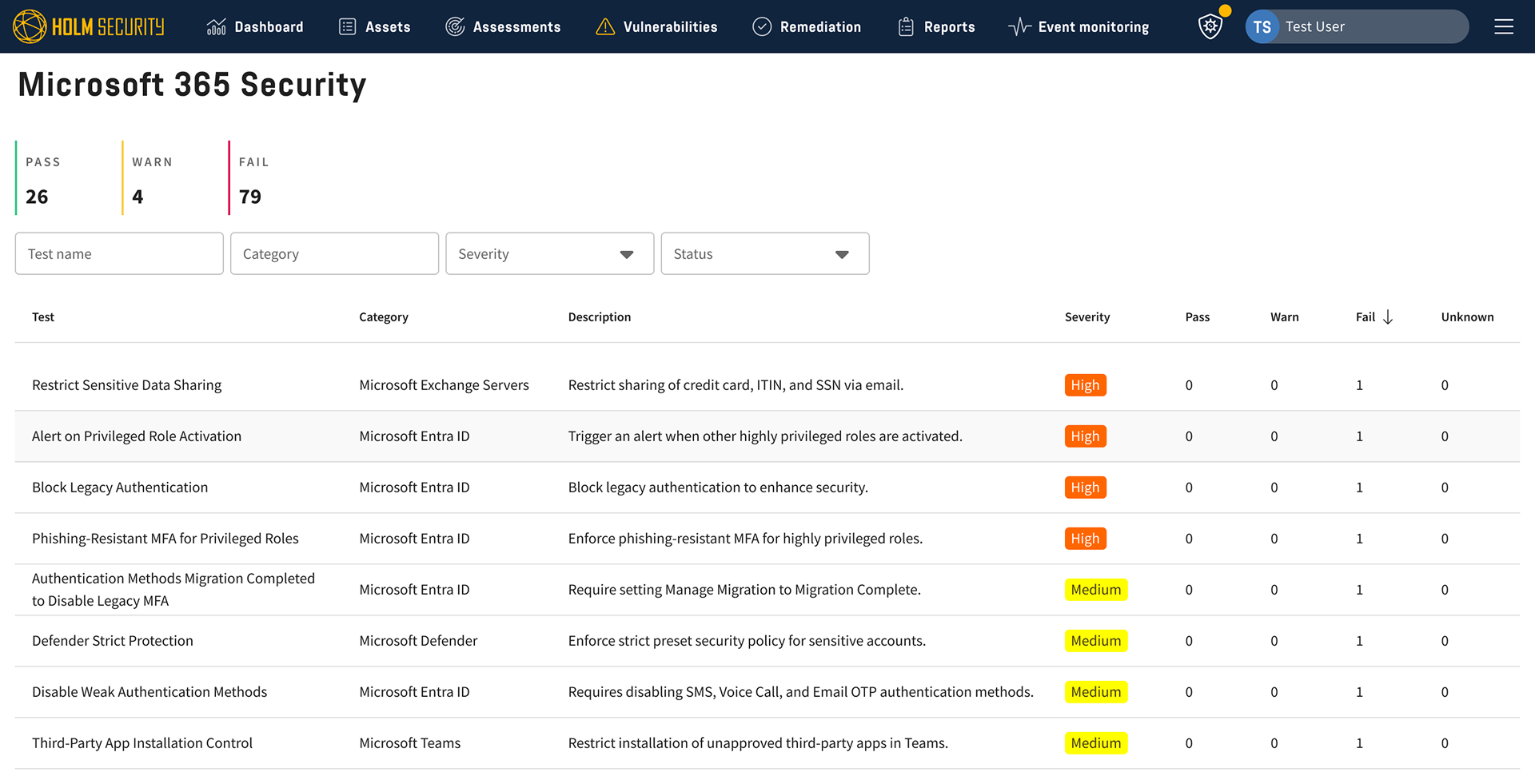
Microsoft 365 security assessment: What Holm Security checks
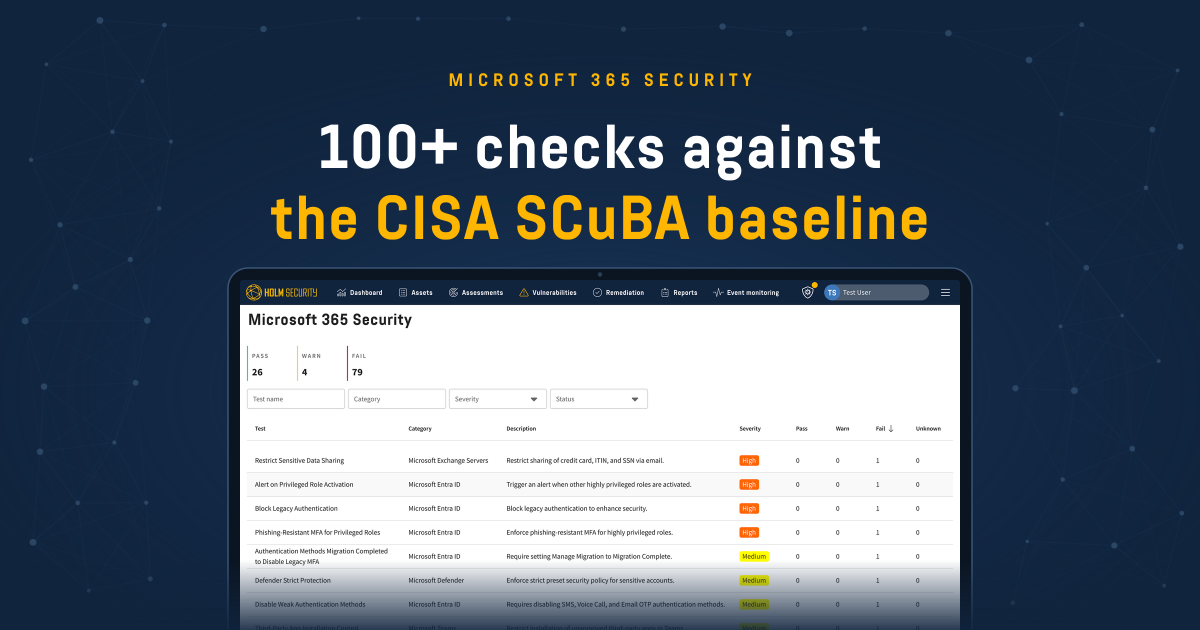
Holm Security's Microsoft 365 assessment runs over 100 checks across the tenant. A few examples of what those checks catch and why they matter in a breach scenario:
- DKIM and DMARC enforcement at p=reject: Many organizations have DMARC in monitoring mode (p=none), which reports on spoofed email but does not block it. Cybercriminals exploiting a domain without enforced DMARC can impersonate executives to launch business email compromise attacks. Holm Security verifies that DKIM is enabled and DMARC is set to enforcement mode.
- Privileged Identity Management (PIM) alerting: Security teams need to know when accounts are elevated to administrative roles. Holm Security checks whether alerts are configured for role assignments, activations, and eligibility changes across privileged directory roles.
- Guest access controls: External collaborators often retain access long after a project ends. Holm Security checks whether guest permissions are restricted, whether guests can invite other guests, and whether inactive guest accounts are being reviewed.
- SharePoint link defaults: The difference between a link that requires sign-in and an "Anyone with the link" default has direct data exposure consequences. Holm Security checks the default sharing behavior across SharePoint and OneDrive so that oversharing is not the path of least resistance.
- Teams federation and app policies: External Teams federation opens messaging channels with organizations outside the tenant. Third-party app policies determine what Teams users can install without approval. Holm Security checks both, along with meeting policies that control anonymous join and lobby bypass.
- Legacy authentication protocols: Basic authentication, POP, IMAP, and SMTP AUTH all bypass modern MFA controls. Holm Security verifies that legacy authentication is disabled at the tenant level and flagged where it remains active on individual mailboxes.
- Audit log retention and SIEM forwarding: Detection and forensic response depend on having the right logs, kept for the right length of time, and reaching the right place. Holm Security checks that unified audit logging is on, retention is set to a defensible period, and that logs are being forwarded to a SIEM where relevant.
Each check returns a pass or fail with the specific users, groups, or settings affected, and a remediation path linked to the relevant Microsoft admin center.
Automated assessment reduces manual audit burden
A manual Microsoft 365 security review against the CISA SCuBA baseline means reviewing 130 controls across multiple admin centers by hand. Holm Security's automated assessment completes the same review in minutes through API-based configuration reads.
Our platform provides:
- Pass/fail results per control with clear identification of affected users, groups, or resources.
- Remediation guidance with step-by-step instructions linked to the relevant Microsoft admin center.
- Continuous monitoring to detect configuration drift as admins make changes or Microsoft introduces new features with insecure defaults.
- Read-only operation enforced through Microsoft's Global Reader role, ensuring no write access to customer tenants.
Want to see how Holm Security supports Microsoft 365 assessment in practice? Get in touch with our team.
FAQ
-
What is a Microsoft 365 security assessment?
It checks how your Microsoft 365 tenant is configured against a secure baseline. Identity, email, collaboration, and data protection each have their own settings, defaults, and blind spots, and an assessment shows where your tenant deviates from the baseline.
-
Why can’t I just run a vulnerability scan on Microsoft 365?
Microsoft controls and patches the underlying infrastructure, so there’s no network to scan the way you scan your own. What you’re responsible for is how the tenant is configured, and that’s what the assessment covers.
-
Isn’t Microsoft Secure Score enough?
Secure Score is useful, but it reflects Microsoft’s view of its own product. Holm Security’s assessment is designed to complement it, and security teams benefit from having both views of their configuration posture.
-
What is the CISA SCuBA baseline?
The CISA Secure Cloud Business Applications (SCuBA) baseline is a federal security standard for Microsoft 365 configuration. Holm Security’s assessment covers the baselines for Microsoft Entra ID, Exchange Online, SharePoint Online, Microsoft Teams, and Microsoft Defender for Office 365.
-
What does Holm Security check?
The assessment runs over 100 checks across the tenant. Examples include DKIM and DMARC enforcement, Privileged Identity Management alerting, guest access controls, SharePoint link defaults, Teams federation and app policies, legacy authentication protocols, and audit log retention and SIEM forwarding.
-
What do the results look like?
Each check returns a pass or fail with the specific users, groups, or settings affected. It also includes a remediation path linked to the relevant Microsoft admin center.
-
Can the assessment change anything in my tenant?
No. It’s read-only, enforced through Microsoft’s Global Reader role, so there’s no write access to your tenant.
-
How often is my tenant assessed?
Continuously. The assessment detects configuration drift when admins make changes or when Microsoft introduces new features with insecure defaults.
-
How long does an assessment take compared to a manual review?
A manual review against the baseline means going through the controls across multiple admin centers by hand. The automated assessment completes the same review in minutes through API-based configuration reads.
-
Does it cost extra?
No. Microsoft 365 Security is included in System & Network Security and Cloud Security subscriptions at no additional cost. It’s only available with cloud deployment.